
Deploy Your Own AI Agent with One Claude Code Command
You can deploy a private, self-hosted AI agent, one that texts you on Telegram, remembers your projects and quietly does scheduled work, by pasting one command into Claude Code to start a guided deployment. No four-hour setup, no Docker debugging, no chasing cryptic errors. An open-source toolkit called hstack turns Claude Code into the engineer who installs Hermes Agent, configures the model, wires your messaging apps and hardens the whole deployment for you. You answer the handful of things only a human can do — about five questions — and the toolkit automates the technical rest.
This guide explains exactly what that command does, why it is reliable where manual setups break and what you can build once your agent is live. If you would rather do it the manual way to understand every moving part first, read the companion post: How to Set Up Your Own AI Agent (the manual guide).
Key Takeaways
- One paste, ~5 questions, ~30 minutes to a live agent on your phone, no terminal expertise required.
- The toolkit pre-solves the failures that break manual setups: the PATH "command not found" trap, a gateway memory leak reported by long-running deploys, the fixed token overhead from tool definitions + system prompt on every request, and auxiliary-capability gaps when an aux slot is overridden without its key.
- It pins a known-good Hermes version (v0.15.2, the stable release as of June 2026) so a future release cannot silently break your setup.
- Secure by default: localhost-bound, allowlist-enforced, secrets written to
.envwithchmod 600, no open bots. - Multi-VPS support: Hostinger one-click, DigitalOcean, Hetzner, and any VPS are supported.
- Running cost is roughly $10–17/month all-in, versus ~$100/month for a premium hosted assistant.
Last tested: 3 June 2026 · Hermes: v0.15.2 · Target OS: Ubuntu 24.04 · Recommended path: Hostinger one-click or an Ubuntu VPS. Versions, prices and provider dashboards change over time — treat the specifics below as accurate as of this date, and check current pricing before you commit.
Use hstack if you have a VPS (or can create one), you use Claude Code, you want your agent reachable from Telegram / Discord / WhatsApp / Mattermost, and you'd rather not hand-debug systemd, PATH, tokens and allowlists.
Do the manual guide instead if you want to understand every command yourself, you'd rather not use agent-driven setup, or you need a highly custom deployment.
1. The problem: setup was never the hard part
The uncomfortable truth about self-hosting an AI agent: installing it is easy. Hermes ships its own one-line installer. You can have the binary on a server in two minutes. The hard part, the one that eats your afternoon and makes people give up, is everything after the install.
The author of the toolkit learned this firsthand. The first manual Hermes setup took about four hours. Every error was a wall: Docker networking that would not cooperate, a gateway that crashed and refused to restart, a WhatsApp allowlist that silently rejected the right number, a model that hit a context-window error on the first long message. None of these are exotic. They are the normal experience of setting up Hermes by hand, and they are all documented in the project's own issue tracker.
Something interesting happened during that four-hour slog. Once Claude Code had access to the server, it did roughly 90% of the work itself: ran the installer, wrote the config, set the tokens, restarted the gateway and diagnosed failures. The human's job shrank to "paste the things a machine cannot mint" - a bot token, an API key, a QR scan.
The toolkit productizes exactly that. It is the accumulated knowledge of every wall worth hitting, packaged so Claude Code can walk the whole path for you and stop only where a human is genuinely required. In short, it is the production layer that Hermes is missing, for people who want a self-hosted agent without living in a terminal.
There is a natural pattern here, and it is the one the toolkit is built on: once a capable coding agent can reach your server, "just have Claude Code do it for you" is a remarkably effective way to install Hermes. The toolkit makes that pattern repeatable and reliable, instead of something you reinvent from scratch each time.
Why a command, not a hosted service?
Worth being clear about what the toolkit is not. It is not a SaaS that runs your agent for you, takes your keys and charges a monthly fee. There are plenty of "managed Hermes hosting" pitches out there, and they trade the entire point of self-hosting (ownership, privacy, low cost) for convenience.
The toolkit keeps the ownership and adds the convenience. Your agent runs on your server, under your keys, with its memory in plain files you can read. The toolkit is just the installer-and-operator layer, delivered as open-source Markdown skills that run inside the Claude Code you already use. There is no account, no server in the middle and nothing to cancel. If the toolkit vanished tomorrow, your agent would keep running exactly as it is.
That is the philosophy: a command, not a middleman. You get the "it just works" experience of a hosted product while keeping everything that makes self-hosting worth doing in the first place.
2. The one command
Open Claude Code and paste this single command:
Install hstack: run
 git clone --depth 1 https://github.com/paarths-collab/hstack.git ~/.claude/skills/hstack
 && cd ~/.claude/skills/hstack && ./setup
Then add an "hstack" section to CLAUDE.md listing the commands and run /hermes-deploy.
That is the entire install. Claude clones the toolkit (a library of small Markdown skills), runs the setup script to register them as slash commands and adds a short section to your CLAUDE.md so it knows the command set. Then /hermes-deploy runs the full end-to-end setup.
You do not need to prepare anything in advance. The deploy command is conversational: it asks where to deploy, which model to use and which messaging platforms you want, then it does each step and pauses only when it needs something from you.
On Windows: Hermes now runs natively, the CLI, gateway, TUI and tools all install without WSL (
iex (irm https://raw.githubusercontent.com/NousResearch/hermes-agent/main/scripts/install.ps1)in PowerShell). WSL2 is optional. But for an agent that answers 24/7 you still want it on an always-on Linux VPS rather than your laptop, which is the recommended target.
3. What you'll need and how to get each
You will not be asked to gather these ahead of time. During /hermes-deploy, Claude pauses at each step and tells you exactly where to click and what to copy. This table is just a reference for what it will ask for.
| You provide | Where to get it (Claude walks you through it) | Needed for |
|---|---|---|
| Server access | Hostinger: hPanel → Docker Manager → Compose → one-click deploy → search "Hermes". Other VPS: your SSH host, user and password/key. | Install |
| Model API key | Nous Portal (simplest): one subscription covers the main model + auxiliaries + image gen + TTS + cloud browser. Or pick a provider: OpenRouter (400+ models, e.g. DeepSeek), Anthropic, OpenAI, Google/Gemini, X-AI/Grok, MiniMax — Claude pastes the key into ~/.hermes/config.yaml for you. Or OAuth with your existing ChatGPT/Anthropic account where supported. | Model |
| Telegram bot token | In Telegram, message @BotFather → /newbot → name it → username ends in bot → copy the token. | Telegram |
| Your Telegram user ID | In Telegram, message @userinfobot → it replies with your numeric ID. | Telegram allowlist |
| Discord bot token + intents | discord.com/developers → New Application → Bot → Reset Token. Enable Message Content + Server Members intents. Invite via the OAuth2 URL. | Discord |
| Your phone (WhatsApp) | Scan the QR Claude shows: WhatsApp → Settings → Linked Devices → Link a Device. Allowlist = your number, country code, no +. | |
| Slack tokens | api.slack.com/apps → create app → enable Socket Mode → copy the Bot token (xoxb-) and App token (xapp-). | Slack |
| Google AI key (optional) | Free at aistudio.google.com/apikey, only for image/audio features. | Extras |
On secrets: hstack writes each one to ~/.hermes/.env via hermes config set, chmod 600s the file, and avoids printing it back. That said, only paste secrets into a session you trust (your local machine or your own VPS), and rotate any key that may have been exposed in chat history or logs.
4. What /hermes-deploy actually does
The orchestrator runs eight stages in order. Each one is hardened against a specific, documented failure — that hardening is the whole value and it is covered in detail in the next section. The breakdown below shows what each stage does and what (if anything) it needs from you.
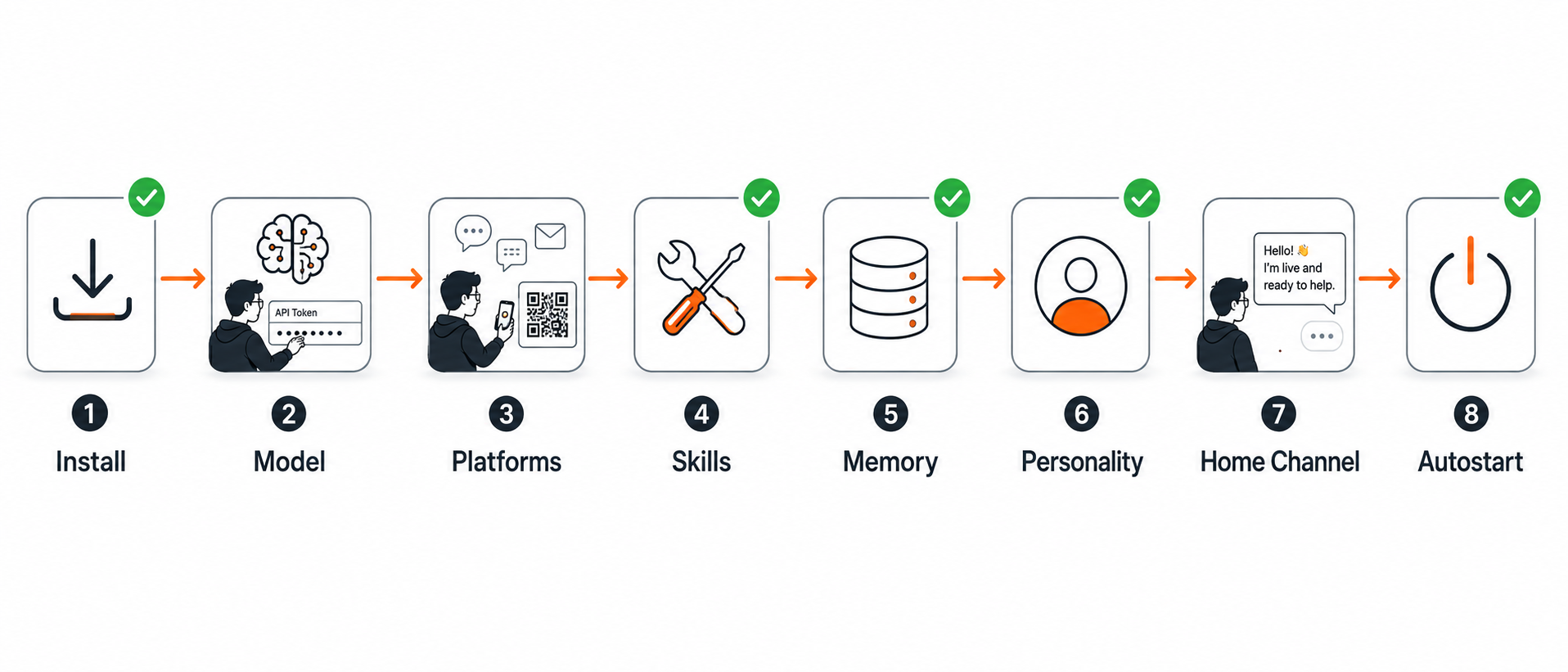 Green checkmarks = automated. Human icons = the ~3 things only you can do.
Stage 1: Install
Hermes is installed on the target, pinned to a known-good version and made PATH-safe so the dreaded "command not found" never appears. The binary is verified before moving on. On Hostinger's one-click image, Hermes is already present, so this stage just confirms it. You provide: nothing (or SSH access for a non-Hostinger VPS).
Stage 2: Model
Your provider and model get configured, validated against the 64,000-token context minimum (smaller ones are rejected at startup), and prompt caching is enabled to control cost. A smoke test proves the agent can actually answer. If you would rather not juggle keys, the hermes setup --portal path covers the model plus web search, image generation and TTS in a single step. You provide: an API key, an OAuth login, or a Nous Portal subscription.
Stage 3: Platforms
The messaging platforms you choose get wired, handling per-platform gotchas: Telegram's numeric-ID allowlist, Discord's two required intents, WhatsApp's QR pairing. The gateway restarts with the nudge it needs after first setup. You provide: a bot token per platform and a QR scan for WhatsApp.
Stage 4: Skills
A curated starter pack of skills is installed from pre-trusted registries, resolving canonical names first so nothing fails on a version-dependent name. You provide: nothing.
Stage 5: Memory
Built-in memory (always on) is confirmed and its real ceiling explained so you are not surprised later. An external provider is only configured if you ask. You provide: nothing by default.
Stage 6: Personality
A lean SOUL.md — your agent's name and style — gets written directly to disk rather than through an interactive wizard that could hang. It is kept small because it is injected on every message. You provide: a name and any style preference.
Stage 7: Home channel
The home channel is set so scheduled tasks and notifications have somewhere durable to land. You provide: nothing (it uses the platform you already wired).
Stage 8: Autostart
The gateway is installed as a service so it survives reboots, lingering is enabled where needed and a nightly restart cron is added to sidestep the memory leak. Then a final verification runs: send a test, confirm a reply. You provide: the first "hello" from your phone.
The result: an empty server becomes an AI replying on your phone, with the only human steps being the handful of secrets and clicks a machine genuinely cannot perform.
See it work: a real deploy walkthrough
It is easier to picture if you see the shape of the conversation. A typical /hermes-deploy run reads like this (abridged):
You: /hermes-deploy

Claude: Where should I deploy your agent?
 1) Hostinger (one-click, easiest) 2) Another VPS over SSH 3) Local
You: 1, Hostinger

Claude: Open hPanel → Docker Manager → Compose → one-click deploy, search "Hermes" and deploy it. It'll show an admin username and password, paste them here,
 then open the web terminal (Docker Manager → Open).
You: Done, here are the admin credentials.

Claude: Connected to the web terminal. Hermes is already installed by the one-click
 image, confirming version... `hermes --version` → 0.15.2. ✓
 Which model? I recommend DeepSeek V4 (cheapest quality) or your ChatGPT login.
You: DeepSeek V4

Claude: Paste your OpenRouter key (get one at openrouter.ai → Keys). It goes straight
 to ~/.hermes/.env, not the chat history.
You: sk-or-...

Claude: Key saved, chmod 600 applied. Context window OK (>=64K). Smoke test: agent
 replied "OK". ✓
 Which platforms? (Telegram is easiest, pure token, no QR.)
You: Telegram

Claude: In Telegram, message @BotFather → /newbot → copy the token. Then @userinfobot
 for your numeric ID. Paste both here.
You: [token] [numeric id]

Claude: Wired. Restarting the gateway (it needs one nudge after first setup)...
 Now message your bot "hello" from your phone.
You: It replied! "Hi, I'm Atlas, how can I help?"

Claude: Setting up autostart so it survives reboots, adding a nightly restart to
 avoid the known memory leak and a nightly backup. Done.
 ✅ Your agent is live. Try /hermes-status anytime.
The whole thing is a guided conversation. You are never staring at a blank terminal wondering what to type next — the next move is always shown.
5. The reliability layer: what the toolkit pre-solves
Anyone can script curl | bash. The value is in pre-solving the failures that the official wizard does not warn you about, every one of which is documented in Hermes' own issue tracker or its FAQ. The catalogue below covers each failure and how the toolkit handles it.
The failures below are not edge cases. They are the predictable, documented experience of a first manual deploy — collected by working through each one directly and cross-referencing them against reported issues.
PATH "command not found" after a successful install
The single highest-churn failure. The installer adds hermes to your PATH in a shell config file, but the live shell and background services like systemd and launchd inherit a minimal PATH that does not include it. The result: a "command not found" right after a "success" message. Most beginners assume the install failed.
the toolkit uses the absolute binary path everywhere and prints the exact reload step, so this never blocks you.
Gateway memory leak → out-of-memory crash
A documented leak (issue #25315) causes the gateway to grow from a few hundred megabytes to tens of gigabytes over roughly 20–35 hours of uptime, then get killed by the OS. A naive Restart=always service turns this into a crash loop.
the toolkit pins a stable version, runs the gateway with sane limits, schedules a nightly restart as a mitigation and clears the stale PID file on startup so a crash does not wedge the next launch.
Fixed per-request overhead → surprise bills
Every request carries a sizable fixed overhead — tool definitions plus the system prompt — before you type a word. On messaging gateways it is worse, because browser tools useless on Telegram still get loaded. Practitioners have reported the fixed share running well over half of each request in some configurations.
the toolkit enables prompt caching, keeps SOUL.md lean, and avoids loading irrelevant toolsets per platform. All of this directly lowers the per-request token cost that drives your bill.
Auxiliary-capability gaps
Hermes runs one main model plus eight auxiliary slots: context compression, vision/image analysis, web-page summarization, approval scoring, MCP tool routing, session-title generation and skill search. Every aux slot defaults to auto — Hermes reuses your main model for that job. It sounds fine. The trap is narrow but real.
Override an aux slot to a different provider without wiring that provider's key, and the dependent feature quietly stops working. No loud error, just silence. the toolkit keeps aux on auto by default, computes which capabilities your chosen main model can serve, and warns you up front. The cleanest way to avoid this class of problem entirely is Nous Portal, which powers the main and auxiliaries from a single subscription — the toolkit will offer it during the model stage.
A provider error taking the whole gateway offline
Issue #16677 documents that a model 429 (rate limit), 401 (auth), or timeout can crash the entire gateway process, taking every messaging bot offline with no user-facing error. the toolkit validates context-window minimums at setup, warns about provider/model combinations known to crash-loop and configures fallbacks so one provider hiccup does not silence your agent.
The bounded memory budget
Built-in memory is structured note-taking against a bounded character budget, not unbounded learning. When it fills, practitioners report the agent burns turns consolidating instead of working, and nothing surfaces that to you. the toolkit explains the budget during setup and makes it a one-step move to attach an external memory provider, correctly installing its dependency, which the stock setup forgets to do.
Platform and host-specific traps
The toolkit bakes in the smaller, version-specific landmines too: it avoids Docker image tags with a known UID-permissions regression, uses tmux/nohup instead of systemd on WSL (where the service install is buggy), enforces allowlists so no bot is left open and pins a known-good, current-stable version so a later release cannot silently change behavior under you.
The full, continuously-updated catalogue with issue numbers lives in the repo's reference/TROUBLESHOOTING.md. This accumulated knowledge, not the install script, is what the toolkit really is.
If something still goes wrong
The toolkit pre-solves these during deploy, but if you are debugging an existing setup, this quick map covers the most common symptoms. Running /hermes-fix applies these automatically.
| Symptom | Likely cause | Fix |
|---|---|---|
hermes: command not found | Shell hasn't reloaded PATH | source ~/.bashrc; use the absolute binary path |
| Bot runs but never replies | Allowlist has @username not the numeric ID | Use the numeric ID; check the full token |
| Discord bot reads nothing | Missing privileged intents | Enable Message Content + Server Members |
| Gateway crash-loops | Stale gateway.pid after a crash | /hermes-restart (clears the lock) |
| Memory balloons, then OOM | The gateway leak over ~a day | Nightly restart cron (the toolkit adds this) |
| Vision/web "doesn't work," no error | Auxiliary model not keyed | Add a provider key |
When in doubt, /hermes-status shows the current state and /hermes-fix repairs it.
Citation capsule: The Hermes gateway memory leak (reported as issue #25315) causes RAM to grow from a few hundred MB to tens of gigabytes over 20–35 hours of uptime, ultimately triggering an OS-level kill. A naive
Restart=alwaysservice converts this into a crash loop. The toolkit's nightly restart cron is the documented mitigation. (NousResearch/hermes-agent, 2025)
6. The command library
/hermes-deploy is the orchestrator, but the toolkit ships a library of small commands you keep using long after setup. Each is a Markdown skill: clear instructions plus a short script, no new infrastructure.
Orchestrator
/hermes-deploy— the full end-to-end deploy. The command most people run first and the one this guide is built around.
Setup
/hermes-install— installs Hermes on a local machine or over SSH, pinned to a known-good version and PATH-safe./hermes-model— configures your provider, model and API key; frontier-default and capability-aware, so mismatched context windows are caught before they cause issues./hermes-skills— installs a curated starter skill pack from pre-trusted registries./hermes-memory— built-in memory is on by default; run this to attach an external provider correctly (including its dependency, which the stock docs skip)./hermes-soul— writes the agent's name and personality toSOUL.md, kept lean to reduce per-message token cost./hermes-home— sets the home channel for notifications and scheduled tasks./hermes-cron— adds scheduled tasks in plain language; converts your local time to UTC automatically.
Platforms
/platform-telegram— the reliable headless wedge; pure token and numeric ID, no QR./platform-discord— wires the token plus the two required privileged intents./platform-whatsapp— QR pairing and phone-number allowlist./platform-slack— Socket Mode with both the Bot token and App token./platform-mattermost— for self-hosted teams.
Operations (the part that keeps your agent alive)
/hermes-status— health check across gateway, platforms, memory and logs, in plain language./hermes-restart— clean restart that clears stale locks before bringing the gateway back up./hermes-update— backs up first, bumps the pinned version, then re-verifies every platform still responds before declaring success./hermes-fix— diagnose and repair common failures; applies the catalogued fix for whatever it finds./hermes-backup— snapshots config, memory and sessions so you can always roll back.
This is the difference between a one-time install script and a tool you live with. When something needs attention months later, you do not re-learn Hermes internals — you run /hermes-status or /hermes-fix and let Claude handle it.
7. What you'll actually do with your agent
Once it is live, the question becomes "what should it do for me?" These are real workflows people run on Hermes today.
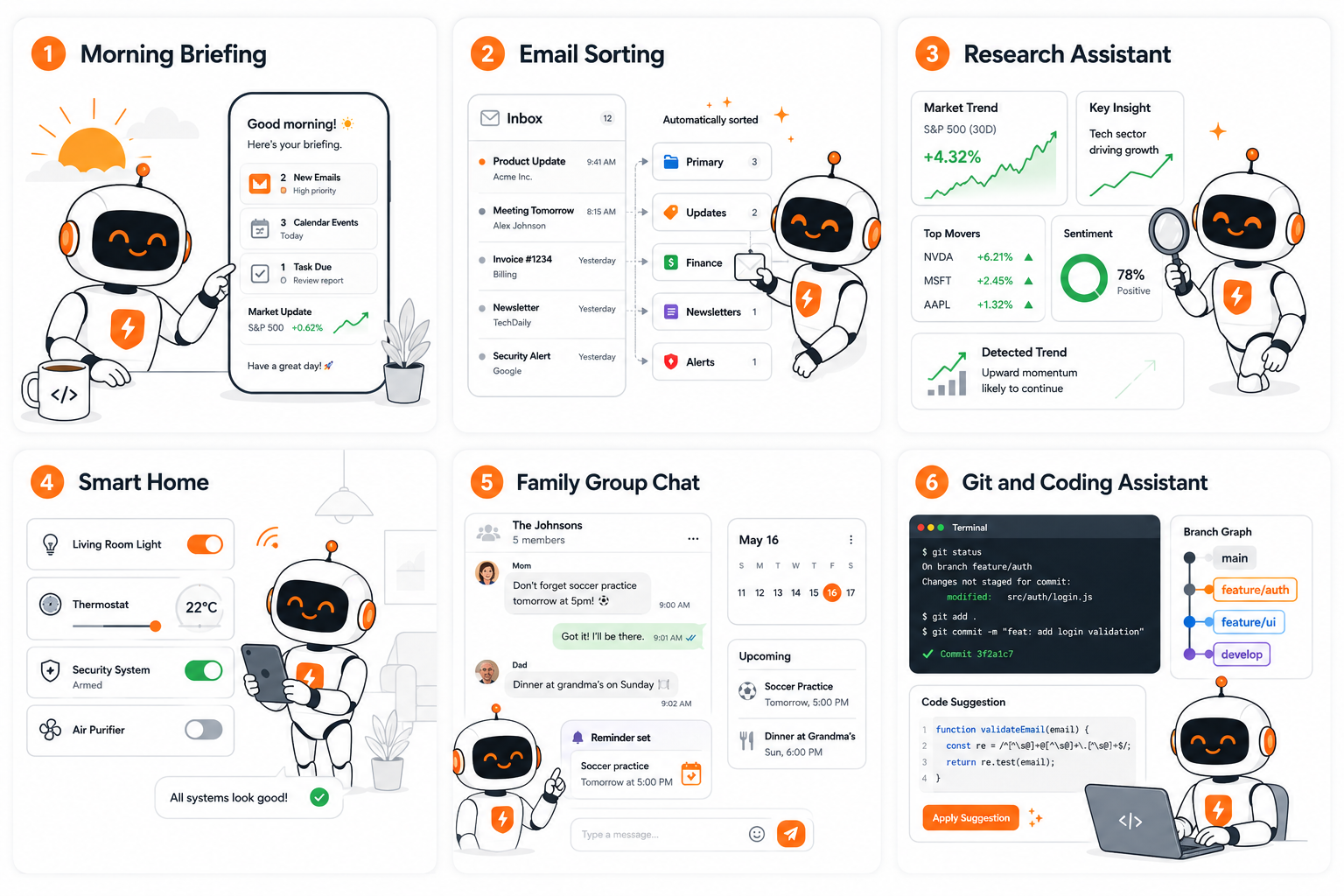 Six things people do with their agent in the first week.
A morning briefing
The classic. A cron job at 8 AM searches the web and delivers a summarized briefing to Telegram. People have extended this into localized financial briefings rendered as daily image cards and AI-research digests that track which signals they ignored last time.
Inbox triage
Give the agent its own inbox and have it summarize email, pull out action items and send you a digest before you open your laptop. Developers run full production email pipelines on it.
Research that compounds
Run one query across Reddit, X, YouTube, Hacker News and prediction markets at once. Pair it with a self-hosted search container to avoid per-query costs, or build a "second brain" wiki that accumulates knowledge instead of letting notes rot.
Home and device control
With a Home Assistant token, control lights, climate and switches by texting your agent. There are community skills for Android control and even remote car start and EV battery checks. People run this 24/7 on a Raspberry Pi.
A family assistant
One shared agent for the whole household over WhatsApp or iMessage, each person uses it differently. One user frames his family setup as replacing a $200/month subscription; another has it write daily bedtime stories for his daughter.
Developer automation
Periodic pull-request review on a cron (no webhook needed), real-time PR comments via webhook, nightly repo backups and end-to-end coding workflows. This is the deepest category in the community.
The common thread: this is a programmable, always-on assistant that reaches you where you already are. The toolkit just gets you to that starting line in one command instead of an afternoon.
Recipes to try in your first week
You set these up by just telling your agent in plain language — it writes the cron job itself and converts your local time to UTC. A few to start with:
- "Every weekday at 8am, summarize the top 5 AI stories from the last 24 hours and send them here."
- "Every night at midnight, commit and push my notes repo to GitHub."
- "Every Monday at 9am, give me a short summary of my open GitHub pull requests."
- "Every hour, check if my website is up; only message me if it's down."
- "Every evening, list anything I told you to remember today so I can confirm it."
Start with one. The value compounds as you add more and as the agent's memory of your preferences fills in.
Day-2 operations: living with your agent
Setup is day one. The reason the toolkit ships a command library is day two and beyond — the small, recurring things that otherwise mean re-learning Hermes internals each time.
- Check on it:
/hermes-statusreports gateway state, connected platforms, memory usage against the ceiling and recent errors, in plain language. - Add a platform later: decided you want Discord too? Run
/platform-discord, it walks you through the token and intents without touching anything else. - Something acting up:
/hermes-fixruns the diagnostics and applies the catalogued fix for whatever it finds (a stuck gateway, a silent capability, a permission issue). - Upgrade safely:
/hermes-updatebacks up first, bumps the pinned version and re-verifies every platform still responds before declaring success. - Before anything risky:
/hermes-backupsnapshots your config, memory and sessions so you can always roll back.
This is the difference between a script you run once and a tool you actually keep. You are not maintaining Hermes by hand; you are asking Claude to, with the toolkit's hard-won knowledge behind it.
8. Manual vs one-command
Both paths end at the same place, a working, self-hosted agent. The difference is how you spend your time and which mistakes you make.
| Manual setup | the toolkit (one command) | |
|---|---|---|
| Time | ~30–60 min, longer with errors | ~30 min, mostly waiting |
| Terminal skill needed | Moderate | Minimal |
| Traps you hit | All of them, the hard way | Pre-solved |
| Version safety | You choose (and might pick a broken one) | Pinned to a known-good build |
| Security defaults | Up to you | Localhost, allowlists, chmod 600 by default |
| Ongoing operations | Re-learn Hermes each time | /hermes-status, /hermes-fix, etc. |
| Understanding gained | Deep | Shallower (but the docs are there) |
The honest recommendation: if you enjoy understanding your tools, do it manually once with the companion guide, you will be a better operator for it. If you just want a reliable agent, or you are setting one up for someone non-technical, use the toolkit.
Who the toolkit is for (and who it isn't)
A great fit if you are:
- A non-technical person who wants their own AI on WhatsApp or Telegram without learning Docker.
- A developer who could do it manually but would rather not re-debug the same five traps.
- Someone setting up an agent for a family member, a small team, or a client.
- An OpenClaw user migrating who wants the move handled safely.
Probably not for you if you are:
- Building something deeply custom that needs you to understand every internal, start with the manual guide instead, then automate.
- Unwilling to use a model API or a subscription at all (Hermes needs a model regardless of how you install it).
- On a platform with no Linux/WSL2 path available.
The toolkit does not lock you in. It is plain Markdown skills plus a small script; everything it does, you could do by hand. It just means you do not have to.
9. Where it deploys
The toolkit runs on any VPS. Hostinger offers a one-click Docker deploy that is convenient for non-technical users, and other providers work well via SSH.
- Hostinger (one-click): one-click Docker deploy, then paste the toolkit command in the web terminal. KVM 2 (2 vCPU / 8 GB) is comfortable.
- DigitalOcean: an Ubuntu 24.04 Droplet (2 GB+ RAM, ~$6–12/month), SSH in, paste the command.
- Hetzner / any VPS: a CX22 (~€4/month) or any Ubuntu box works identically.
A practical minimum is 1 vCPU and 2 GB of RAM when the model runs via an API; add headroom for browser automation. Always check renewal pricing — cheap intro rates often step up.
10. Security defaults
The toolkit is secure by default because the ecosystem's default is not. Out of the box:
- Localhost binding. Nothing is exposed to the network unless you explicitly, knowingly opt in.
- Allowlists enforced. No open bots, every platform requires an allowed-users list.
- Secrets locked down. Keys go to
~/.hermes/.envwithchmod 600, never toconfig.yamland never into chat. - No sudo installs. Avoids the root-owned-file permission failures and the wider attack surface.
- Sandbox-friendly. Encourages running the agent's terminal work in a container rather than directly on the host.
This matters because self-hosted AI servers are routinely found exposed to the internet with no protection at all. Making "secure" the default, rather than an optional afterthought, is one of the toolkit's most valuable features.
11. What's real vs what's marketing
The toolkit does not oversell Hermes and neither should you. The candid version:
Genuinely good: persistent memory across projects (the most-praised feature), "it just runs" reliability, one of the broadest messaging-platform integrations of any open agent, and cheap, transparent self-hosting where memory is plain files you can read.
Overstated: the "agent that grows with you / self-improving" framing. In practice, memory is a bounded character budget — the agent writes small markdown files and curates them. It is structured note-taking against a budget, not open-ended learning. Headline performance numbers are usually vendor-internal.
Real gotchas (all handled by the toolkit): large fixed token overhead per request, a gateway memory leak over ~a day, and silently-degrading auxiliary features.
Why the honesty? Because the self-hosted-agent space has a credibility problem: inflated claims and a flood of near-identical marketing posts. A tool that tells you the truth about its own foundation is one you can actually trust to run your agent.
12. Migrating from OpenClaw
If you are coming from OpenClaw, Hermes has a built-in migration that imports your settings, memory, skills and API keys (hermes claw migrate). The toolkit wraps this with two safeguards: it backs up first and it helps you re-verify imported skills before trusting them. OpenClaw's marketplace had a documented supply-chain problem with malicious skills, so importing blindly is a real risk. The migration is also a major reason people are moving to Hermes in the first place: a string of security issues on the other side, against Hermes' "it just runs" reputation.
Coming soon: Digital Crew Technology agent plugins
Optional specialist agent plugins for the toolkit are in development. Track progress and see the full roster in the Agent Plugins section of the repo.
Want this running for your team? A personal agent is the first step toward a whole digital workforce. Digital Crew Technology builds Crew OS — self-hosted Digital Workers like Max (sales), Claire (market research) and Sophie (HR) that run on the same owned infrastructure, wired to your tools and answering on the platforms your team already uses. Same principle as this guide: own your agents, don't rent them. See the crew →
13. FAQ
Do I really only need one command?
To install the toolkit and kick off the deploy, yes, one paste. The deploy itself is then conversational: it asks a handful of questions and pauses for the secrets only you can provide (a token, a key, a QR scan, the first "hello"). Everything mechanical is automated.
Do I need to know how to code?
No. Claude Code does the terminal work. You answer plain questions like "what should your agent be called?" and copy a token from Telegram when asked. The Hostinger one-click path needs no terminal at all.
How is this different from just running Hermes' own installer?
The installer puts the binary on your machine — that part was never hard. The toolkit handles everything after: model and capability wiring, platform gotchas, memory, autostart, security and the dozen documented failure modes that the official wizard does not warn you about. It is the production layer, not a re-skinned installer.
How much does it cost to run?
Roughly $10–17/month all-in: $4–7 for the VPS and $6–10 for model API fees on a cost-effective model like DeepSeek V4. That is well below premium hosted assistant tiers around $100/month.
Is it safe?
The toolkit is secure by default: localhost binding, enforced allowlists, and locked-down secrets (written to .env with chmod 600, never to chat). Network exposure is always an explicit, warned opt-in.
Which model should I use?
Hermes supports OpenRouter (400+ models), Anthropic, OpenAI, Google/Gemini, Nous Portal (300+), X-AI/Grok, and MiniMax. For the easiest start, Nous Portal (main + aux + image + TTS in one subscription). For cost-to-quality, OpenRouter routed to a frontier-class open model. For maximum quality, Anthropic/OpenAI/Google direct. For zero new accounts, OAuth with your existing ChatGPT subscription. We recommend at least 64K context — Hermes is built around larger context windows for multi-step tool use and may refuse to start with very small ones. Switch anytime with /hermes-model.
Which messaging platform should I start with?
Telegram — it is the only fully headless option (pure token and numeric ID, no QR or OAuth). Add WhatsApp, Discord, Slack, or Mattermost afterward.
What happens when Hermes releases a new version?
Nothing breaks, because the toolkit pins a known-good version (v0.15.2, the stable release as of June 2026). When you choose to upgrade past it, /hermes-update backs up first, updates and re-verifies that every platform still responds.
Can I move my agent to a different server later?
Yes. Back up ~/.hermes with /hermes-backup, move the archive and restore it. All your config, memory and skills travel with it.
What if something breaks weeks later?
Run /hermes-status to see what is wrong, or /hermes-fix to diagnose and repair. The operational commands mean you do not have to re-learn Hermes internals to keep your agent healthy.
Is the toolkit affiliated with Nous Research or Hostinger?
No. The toolkit is independent, open-source (MIT) software. Hermes Agent is a project of Nous Research; Hostinger is one deploy option, and other VPS providers are fully supported.
Can I run more than one agent?
Yes. Each Hermes profile is independent, with its own config, memory and gateway. You can run separate agents, say, a personal one and a work one, on the same server or on different servers and deploy each with the toolkit. Just keep their data directories and ports distinct.
Will it work with a local model instead of an API?
Yes, via Ollama, if your hardware can run a genuinely capable model (small models hallucinate tool calls and break the agent). The trade-off is speed and quality versus a frontier API model. Most people use an API for quality and keep costs down with caching and a cost-effective model.
How long does the whole deploy take?
About 30 minutes end to end and most of that is waiting — for the install to finish, for the gateway to start, for you to create a bot token. The actual hands-on time is a few minutes of answering questions.
What does the toolkit install on my own machine?
Only the Claude Code skills: a folder of Markdown files under ~/.claude/skills/hstack and a short section appended to your CLAUDE.md. It does not install Hermes locally (Hermes runs on your server) and it does not run anything as a background process on your laptop.
Is my data sent anywhere I don't control?
Your agent's memory, conversations and config live on your server as local files. The only data that leaves is what you send to your chosen model provider (and to messaging platforms you connect). Pick a provider you trust, or run a local model for full privacy.
Can I uninstall or undo it?
Yes. The skills are just files — delete the ~/.claude/skills/hstack folder and remove the toolkit section from CLAUDE.md. On the server, Hermes is a normal install you can remove. Nothing is hidden or locked.
What if I get stuck mid-deploy?
/hermes-deploy is resumable in practice, each stage writes real config, so you can re-run it or run the individual command for the stage that failed (for example, /hermes-model or /platform-telegram). Because Claude is driving, you can simply tell it what went wrong and it will diagnose from the live state.
Does the toolkit cost anything?
No. The toolkit itself is free and MIT-licensed. Your only costs are the VPS and the model API fees, the same costs you would have setting Hermes up manually. The toolkit does not add a fee, a subscription, or a markup.
Can I customize what the deploy sets up?
Yes. The skills are plain Markdown — fork the repo and edit any SKILL.md to change defaults (a different starter model, an extra cron job, a custom SOUL.md template). Because there is no compiled binary, "customizing the toolkit" is just editing text files.
What model context size do I actually need?
We recommend at least 64,000 tokens — multi-step tool use needs the headroom, and Hermes may refuse very small windows at startup. The toolkit validates this for you during the model stage, including for the auxiliary models used for vision and summarization.
How do I add a second messaging platform after setup?
Run the relevant platform command on its own: /platform-discord, /platform-whatsapp, /platform-slack, or /platform-mattermost. It wires only that platform and restarts the gateway, leaving everything else untouched.
Will my agent keep running if I close my laptop?
Yes. The agent runs on your server, not your laptop. The toolkit installs the gateway as a service that survives reboots, so your laptop can be off entirely and the agent keeps answering on your phone.
14. Get started
After the deploy finishes, you will have:
- A self-hosted Hermes Agent running 24/7 on your own server.
- It replying to you on at least one messaging platform (Telegram and any others you added).
- A pinned, known-good version that will not break under you.
- Autostart on reboot, a nightly restart to dodge the memory leak and a nightly backup.
- Secure defaults: enforced allowlists, locked-down secrets, localhost binding.
- A library of commands (
/hermes-status,/hermes-fix,/hermes-update, …) for everything after.
To get there:
- Pick a VPS and provider path that fits your setup style, for example Hostinger's one-click path.
- Paste the toolkit command into Claude Code.
- Answer the five prompts (token, key, name, platform, first "hello").
- Say hello to your new agent.
The repo is open-source and MIT-licensed: github.com/paarths-collab/hstack. Prefer to understand each step first? Read the companion beginner's setup guide.