


Desktop
Windows
The main window and its traffic lights, floating page windows, moving and sizing, the minimize pour, tiling, and what phones get instead.
The desktop has one main window, the routed page in the shell's card, and floating windows over it: page windows (up to six), Finder, files, sticky notes and Desktop Settings. All of them stack in one order, always below the sidebar. A click anywhere in a window, its page included, brings it forward.
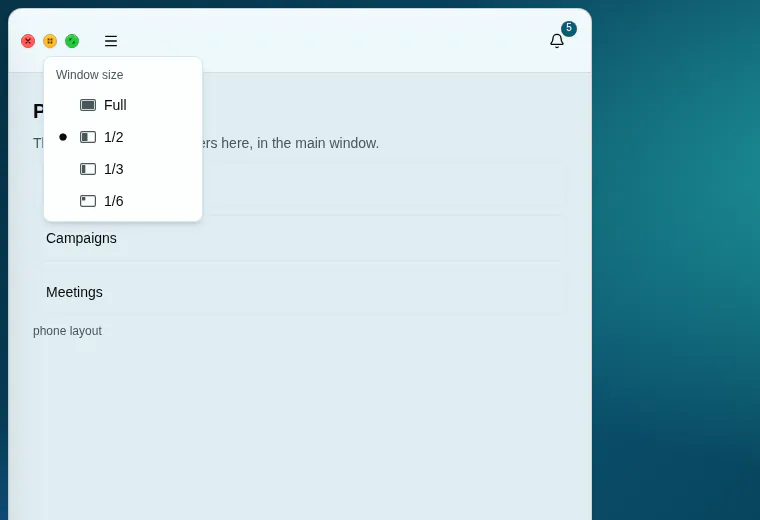
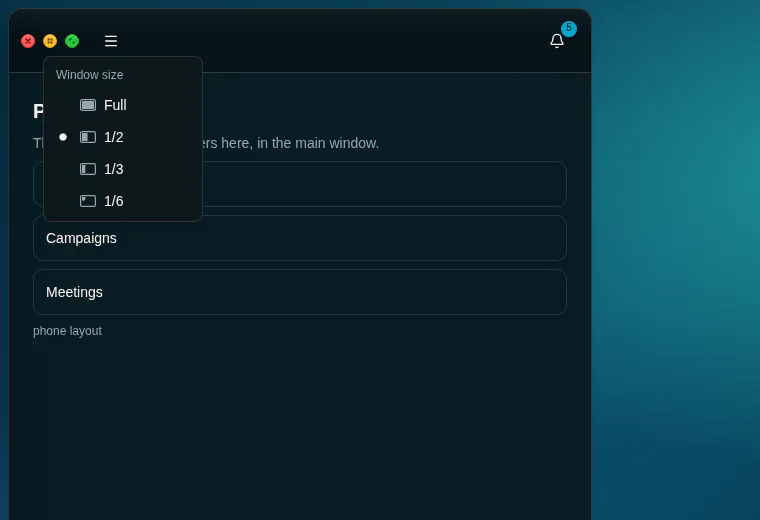
Traffic lights#
| Light | Colour | Does |
|---|---|---|
| Red, close | #ff5f57, rim #e0443e, glyph #4d0000 |
The main window: closes it to the desktop. It navigates to /desktop, and the route stays mounted, so nothing reloads when it comes back. A floating window: closes it. ⌥W / Alt W closes the front window |
| Yellow, size | #febc2e, rim #dea123, glyph #5a3d00 |
Opens the Window size menu: Full, 1/2, 1/3 or 1/6 of the desktop |
| Green, zoom | #28c840, rim #1aab29, glyph #0a4d0f |
Switches between filling the area right of the sidebar and floating over the desktop. A double-click on the title bar does the same |
- 14 px circles, 8 px apart, at the left of the title bar, their glyphs always drawn. A light that does not apply is grey and disabled.
- An unfocused window's lights go grey until the pointer is over them, as on a Mac.
- A press scales the light to 90%, except under reduced motion.
- Opening a page brings the closed main window back with it, filling the area.
Window size#
The yellow light's menu, headed Window size, gives the window a share of the desktop area right of the sidebar, 8 px between places:
| Size | Share | Places | From a full window, it goes to |
|---|---|---|---|
| Full | The whole area, as green does | 1 | — |
| 1/2 | Half the width, full height | 2 side by side | The left half |
| 1/3 | A third of the width, full height | 3 side by side | The middle third |
| 1/6 | A third of the width, half the height | 3 × 2 | The top-middle sixth |
- The window takes the place of that size nearest its centre. Choosing the same size again moves it on to the next place, left to right, then top to bottom.
- The menu ticks the size the window fills, if any; each size has a small picture of its share.
- Floating windows have the same menu. Their Full is the zoom green toggles, so green un-zooms them to where they were.
Moving and resizing#
| Rule | Value |
|---|---|
| Title bar | 44 px on floating windows (glassChrome, title centred); the main window's shell bar is 64 px |
| Corners | 12 px |
| Smallest window | 360 × 240 px |
| Resize handles | Every edge (8 px strips) and every corner (12 px squares) |
| Kept within reach | The left edge stops at the sidebar, the top at the desktop's top, and at least 96 px stay on screen to the right and below, so the whole title bar can always be grabbed |
| A new window | Opens 28 px down and right of the previous one |
- Drag by the title bar; its buttons, fields and tabs never start a drag.
- A drag or resize writes
left,top,widthandheightdirectly, at pointer speed, and never animates them. Meanwhile page frames stop taking the pointer, so an<iframe>cannot swallow the drag. - When the browser window narrows (a docked DevTools, half a screen) no window moves: only what shows is fitted, within reach as above. Wide again, every window is where it was.
- Floating, the main window's page lays itself out for the window's width, down to the phone layout in a narrow window: its breakpoints measure the window, not the screen. Its shell bar keeps the desktop form and the traffic lights at any width.
- The focused window has a deeper shadow; an unfocused one's title dims to 62% until it is hovered.
Minimize#
- ⌥M / Alt M, or a click on the front window's entry in the WINDOWS group, minimizes it.
- The window pours into its WINDOWS entry: it narrows faster than it shortens (55% of its width while still 80% of its height, then both down to 4%) and fades, over 360 ms, about the entry's centre. Only then is it hidden; it stays mounted, so its page keeps its state.
- Its WINDOWS entry brings it back: the pour plays in reverse, out of the same point.
- The main window pours the same way. Closing it to the desktop, a load and a reload show or hide it at once.
- A minimized entry is greyed, with a small dot.
Page windows#
- A page window is the real page in a same-origin
<iframe>. The page notices it is framed and drops the shell around it (sidebar, desktop, tab bar, banners, the assistant's bubble, the notification bell); its data, actions and access checks are unchanged. - At most 6 are open at once. A seventh says "Up to 6 page windows can be open at once. Close one to open another." Minimized windows keep their page alive.
- ⌥-click / Alt-click a sidebar link, or right-click › Open in new window, opens one. A plain click shows the page full, filling the area, and never takes a page the member put aside: minimize one page, open another, and both wait in WINDOWS.
- The address follows the front window. While a page window is in front, the browser's address shows its page, following it as the member moves inside, and the sidebar lights that page's link. It is written in place: no navigation, no history entry. With the main window, the desktop, Finder or a file in front, it shows the main window's route.
- Save to folder files the page on screen as a shortcut; Show in the main window moves it there and closes the floating one.
- A frame from another origin (a PDF, a sandboxed HTML file) lets the pointer through while its window is behind another, so the first click there only brings the window forward.
- External
https://links open in a new browser tab, never in a window. - Open windows and their places are remembered in this browser only, and reopen behind the main window, which always comes back filling the area.
Tiling#
Tile windows (⌥G / Alt G, the WINDOWS group's tile button, or the desktop's menu, with two or more windows on screen) lays every open window side by side over the desktop area, the main window too while it floats, and brings them in front of a main window that fills the area. The grid is near-square and filled row by row (2 side by side, 4 as 2 × 2, 6 as 3 × 2), 8 px apart, with the last row spread across the full width. On a narrow desktop the 360 × 240 minimum wins and tiles overlap rather than shrink further.
Phones#
Below 768 px there are no windows. The shell is the classic full-screen page, the traffic lights are not drawn and /desktop is a home-screen page. Page windows stay open and come back on a wider screen. Finder, files and settings open as full-height sheets that slide up, with Back, a grab handle and controls at least 40 px; pull the handle or the title bar down (140 px, or a quick flick) to close.
Guidelines#
Use the main window for the page the member is working on, a page window to keep another page beside it, and Finder, file and note windows for what lives on the desktop.
Behaviour: a page always shows full and a page put aside is never taken: the click that would replace it opens a page window instead. Windows never cover the sidebar and can always be grabbed again.
Don't draw window chrome of your own, animate a window's geometry, let a window slide under the sidebar, or open an outside site in a window.